


/
Server User Guide

How to use the plugins installed on Survival:
GriefPrevention
Learn more here
This is the main way you will protect your builds and creations on the server.
Here's a short video that explains the basics
This is the main way you will protect your builds and creations on the server.
Here's a short video that explains the basics
DeathChest
Learn more here
When you die all your items will be placed into a chest and you'll get coordinates to its location.
• Uncollected chests will be deleted after 1 day
• Find your chests with /deathchest
When you die all your items will be placed into a chest and you'll get coordinates to its location.
• Uncollected chests will be deleted after 1 day
• Find your chests with /deathchest
Starter Kit
When you first join the server you will receive starter items.
If you need these items again, you can claim them once per hour with /kit
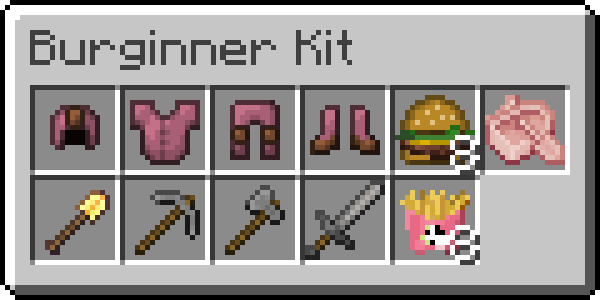
When you first join the server you will receive starter items.
If you need these items again, you can claim them once per hour with /kit
Sleeping!
When players enter a bed a "Sleepin!" sound effect is played and a title shown to you. You can toggle this off with /sleeping
When players enter a bed a "Sleepin!" sound effect is played and a title shown to you. You can toggle this off with /sleeping
Spawn Teleport
You can use /spawn to teleport you back to the main spawn plaza.
One-way only — you cannot teleport back to where you came from.
You can use /spawn to teleport you back to the main spawn plaza.
One-way only — you cannot teleport back to where you came from.
Pop Frame
In the spawn plaza, head up to the Burger Boys food truck and right click the item frames for a treat!
In the spawn plaza, head up to the Burger Boys food truck and right click the item frames for a treat!
Coordinates
Adds your coordinates and time to your action bar. Toggle with /coords.
More commands if you type /coords <Directions | PreciseDirections | Time | TwelveHourTime | XYZ>.
Adds your coordinates and time to your action bar. Toggle with /coords.
More commands if you type /coords <Directions | PreciseDirections | Time | TwelveHourTime | XYZ>.
How to use the data packs installed on Survival:
Armor Statues
Source
Adds a unique book that allows you to alter the properties of armor stands in survival. Video guide
Adds a unique book that allows you to alter the properties of armor stands in survival. Video guide
Player Head Drops
Source
A player will drop their head when killed by another player. The item displays who the killer is.
A player will drop their head when killed by another player. The item displays who the killer is.


How to use the plugins installed on Skyblock:
SkyBlock (BSkyBlock)
Source
Addon for BentoBox, the main plugin you interact with.
Use /is to create or teleport to your island.
Addon for BentoBox, the main plugin you interact with.
Use /is to create or teleport to your island.
Challenges
Source
Addon for BentoBox, these challenges will guide you through SkyBlock, teaching you how to complete various goals.
Use /is challenges to see them.
Addon for BentoBox, these challenges will guide you through SkyBlock, teaching you how to complete various goals.
Use /is challenges to see them.
Warps
Source
Addon for BentoBox, this will allow you to place a sign with [Welcome] on the first line to open your island to visitors.
Use /is warps to see all islands open to visit.
Addon for BentoBox, this will allow you to place a sign with [Welcome] on the first line to open your island to visitors.
Use /is warps to see all islands open to visit.
Island Biomes
Source
Addon for BentoBox, after completing enough challenges you unlock the ability to change the biome of your island at will. Use /is biomes to see your options.
Addon for BentoBox, after completing enough challenges you unlock the ability to change the biome of your island at will. Use /is biomes to see your options.
Island Limits
Source
Addon for BentoBox, limits how many animals, mobs and various other things each player can have to reduce crashing or lag on the server.
Addon for BentoBox, limits how many animals, mobs and various other things each player can have to reduce crashing or lag on the server.
Control Panel
Source
Addon for BentoBox, adds a GUI so you don't need to use commands to interact with everything. Use /is cp to open the Control Panel.
Addon for BentoBox, adds a GUI so you don't need to use commands to interact with everything. Use /is cp to open the Control Panel.
How to use the data packs installed on Skyblock:
Server Rules
Welcome to the Burger Boys Minecraft Server. This server will be primarily a vanilla server with a few quality of life mods and plugins.
This server will be run as a parallel universe to the world that James and DrGluon play on.
In order for everyone to have an enjoyable time on the server we ask that you read and follow the rules. Once you have read the rules, you need to click the ‘I agree with & have read the rules’ below to access the server information.
How to Join
You must read and agree with the rules above first before you can see the instructions to join the server.
To join the server, follow these steps:
1 Be a YouTube Member of James or a Twitch Subscriber of DrGluon's
3 Link your YouTube or Twitch account to your Discord account
On Discord head to User Settings > Connections.
- If you're a YouTube Member of James, connect your YouTube account that has a membership with his channel.
- If you're a Twitch Subscriber of DrGluon, connect your Twitch account.
4 Launch Minecraft Java Edition and go to the Multiplayer tab
5 Click Direct Connect or Add Server and enter play.burgerboys.tv as the server address and join the server.
You will see this screen. Take note of the 4-digit code.
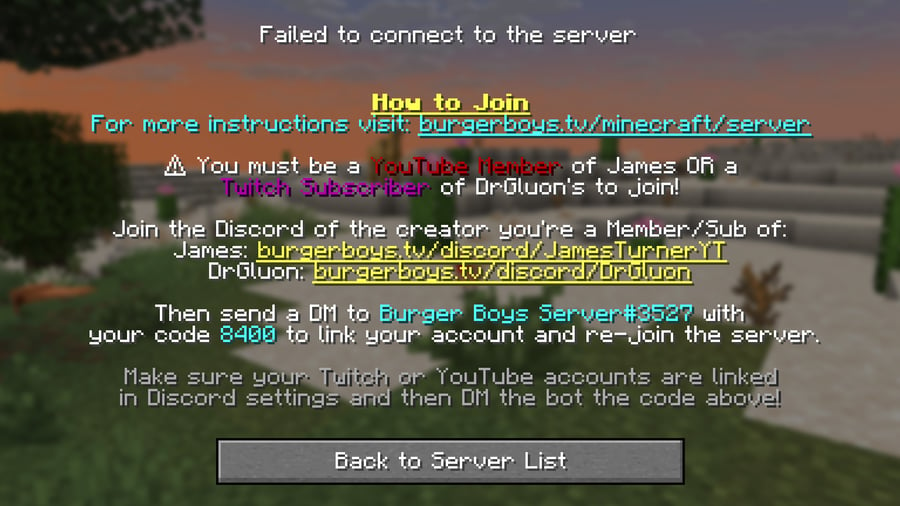
6 On Discord, send a DM to the Burger Boys Server#3527 bot with the code from the previous step.
On Discord, make sure you have the Member List shown. If not, click the button in the top right next to the search box.
Click on Burger Boys Server and enter your 4-digit code here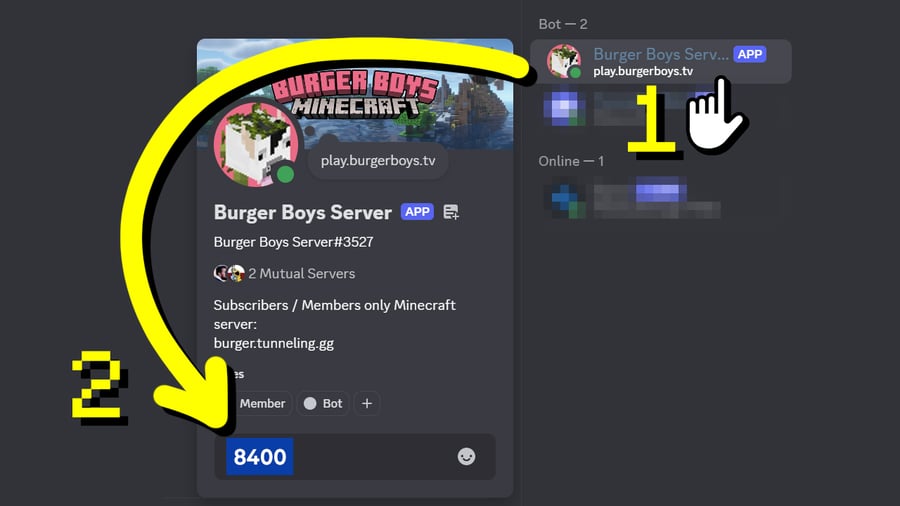 If you do not see the text box, head to User Settings > Content & Social > Social Permissions and select "Allow DMs from other server members."
Make sure to turn this setting off if you don't want other users DMing you after you've completed verification.
Click on Burger Boys Server and enter your 4-digit code here
If you do not see the text box, head to User Settings > Content & Social > Social Permissions and select "Allow DMs from other server members."Make sure to turn this setting off if you don't want other users DMing you after you've completed verification.
7 You will now be able to join and play on the server. Have fun!
If you need any help please ask in our Discord servers!
Thanks for hanging with the Burger Boys! <3 James & Gluon